

3 Months
Jun 2026 - Aug 2026

1 Product Designer (me)
1 Software Engineer
2 Design Advisors
2 Engineer Advisors

Scoping, Exploration, Research/Validation, Prototyping
This project's first phase is currently being implemented, and was part of my product design internship at Persona.
Overview
CONTEXT
Where are we situated? What are we working with?
Persona helps businesses create identity verification experiences for their users. Particularly, the tool in Persona’s platform that designs these verification experiences is called the Flow Editor. Think of it as a design tool specifically for verification screens! Each of Persona’s customers want to design their flow differently, with their own branding, and may even want different versions for different use cases.
a verification flow
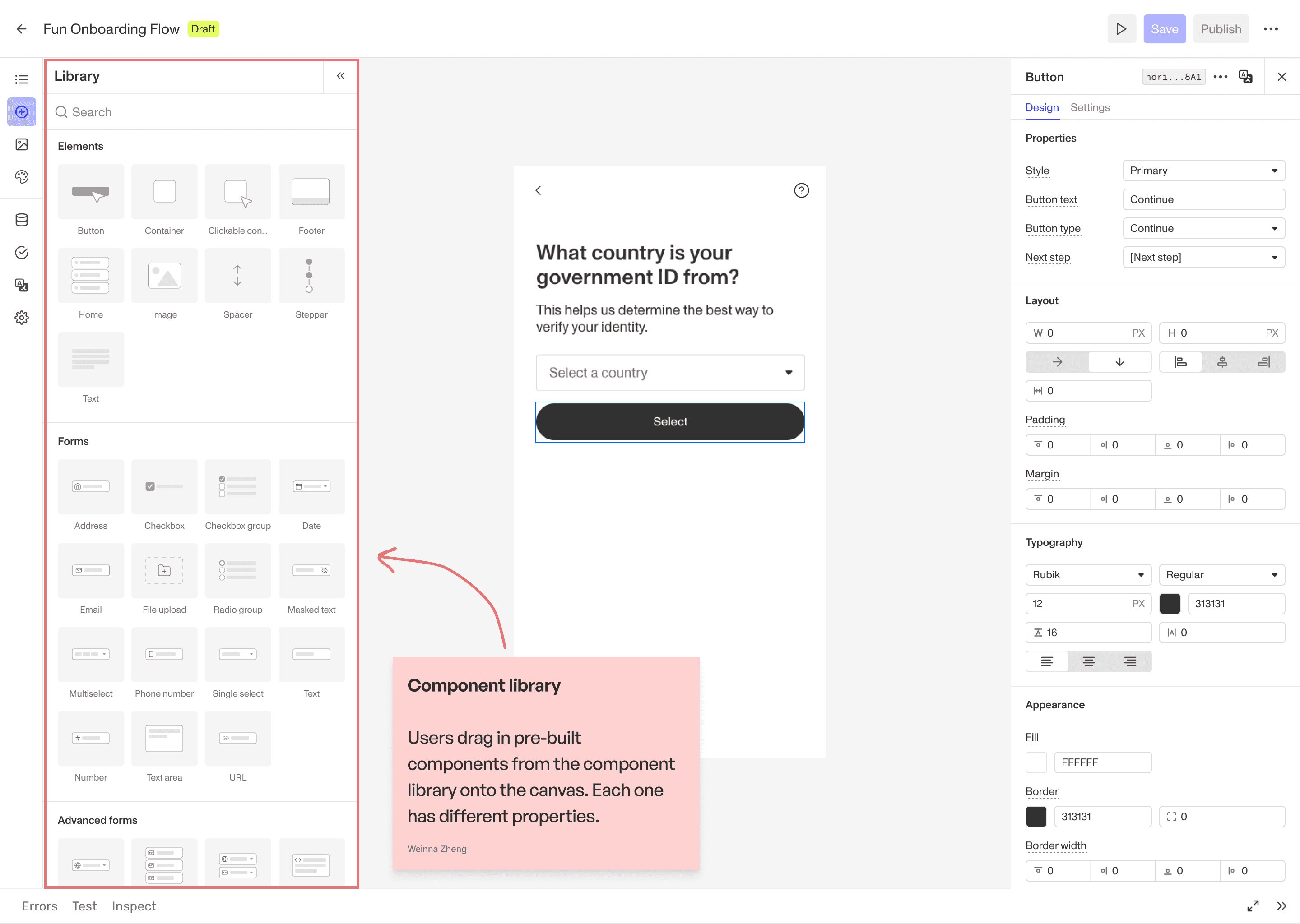
Flow Editor, where customers design verification flows
Similar to design tools like Figma and website builders like Webflow, the layout of the Flow Editor follows this general structure:


THE PROBLEM
An increasing need for customization.
As great as our Flow Editor might be, we currently only support a limited number of components they can drag into their flows. Customers’ needs are becoming more specialized, and the existing component library could not support every experience they wanted to create. For example, what if they wanted a segmented control component? Or a simple visual badge added to a 'Select' component? Customers can't make these with FLE's constraints today.


When this project started, there were 15 active customer feature requests, specifically for Flow Editor components! And certainly many more that had already been addressed.
THE SOLUTION
What if we just let the customer build their own components?
We could’ve continued tackling each new component feature request one by one. But alternatively, we decided to explore the more all-encompassing idea of making a ‘Custom Code’ component that would allow our customers to create their own components directly inside Flow Editor, so that they can create their own customized components in their verification flows.
This would address all 15 active feature requests, in addition to a possibly infinite number of requests in the future!
Defining the problem, a little at a time
THE CHALLENGE
It's not as simple as we thought.
This was an ambiguous project. Exploring the problem space and scoping the project was 90% of the work.
The initial idea was deceptively simple: give customers a place to write code.
But introducing custom code into a visual builder raised broader product questions. How should code components…
Inherit a customer’s theme?
Connect to inquiry data?
Be saved and reused?
Support translations?
Behave on mobile?
And how could we offer this flexibility without compromising the consistency and reliability of the Flow Editor, which happens to be our most end-user-facing, high-usage tool on Persona’s platform?
OUR NORTH STAR
Let's dive into one of these questions: Reusability.
Let’s say someone used our ‘Custom code’ component to build their own segmented control component. Do they want their colleagues to use their segmented control component without having to build it from scratch? That is, do we want it to be saved and reused?
This was a question we pondered near the start of the project. We realized that our ideal end goal would be to make it reusable, since our customers likely have their own internal engineering teams, in addition to less technical enablement teams. It was realistic to assume that our customers would benefit from reusability.
Setting this as our goal inherently led to defining two distinct user groups:

Component Builder
Writes or pastes the code, tests it, ensures that it works.

Component User
Using an instance of what the builder created, treating it like any other component.
This became my north star while working through the remaining questions and when coming up with mockups; I had to ensure that there were two distinct experiences that catered to each user's needs respectively.
I eventually landed here for V0…
AS A COMPONENT BUILDER,
Drag 'Custom code' component onto canvas
The code defaults to "Hello world". Note the available configurations in the right panel.
AS A COMPONENT BUILDER,
Open code editor and write/paste code
The code editor is accessed through either the Design tab or Data tab. When the builder pastes the code, the right panel of the code editor detects any properties or fields defined in the code and extracts them accordingly.
AS A COMPONENT BUILDER,
Edit data field configurations
The fields may have been assigned an incorrect type. The builder can manually fix them if required. They can also map the code's fields to inquiry fields (fields defined within the Flow Editor for a particular flow), so that data flows properly into Persona's system.
AS A COMPONENT BUILDER,
Edit design properties and save
Setting design properties configures properties that the component user can modify in the Design tab. They can set a default value or leave it blank.
AS A COMPONENT USER,
Paste* the built component and configure design properties
*This V0 is not truly reusable yet, so component users can only "reuse" builders' components by copy-pasting them from elsewhere. In the ideal final version, the goal is to allow the builder to save their creation to a "custom component library" - where the component user can then drag and drop from the left panel onto the canvas.
The component user should use this segmented control custom component just like any other component, by modifying the properties through the design tab in the right panel.
AS A COMPONENT USER,
Map data fields to inquiry fields
Just like any other component, data fields must be mapped to inquiry fields in the Data tab.
It’s not fully over yet
CURRENT STATE
On the road to full reusability!
The above V0 is currently being implemented! After some UXR, the project is set to move forward to a V1 where:
Component builders can save their custom component to some custom component library - with version handling!
Component users can then drag and drop a custom component that a builder created into whatever verification flow they're working in, and fully use it the same way they'd use any other component.
Even scoping and documenting this phase rollout was part of my work too! I explored what reusability could look like in order to fully discover what pieces we were working with and allow us to make decisions. There were plenty of alternatives we discussed too.
REFLECTION
Some final thoughts
The ambiguity made the project seem simple. I dove deep to uncover all the pieces, making it the most complex project I've worked on.

This project is inherently technical; we're designing a space for a builder to code up a component and connect it to Persona's system. As a designer, I had trouble defining exactly what a builder would need in the UI to help them make this component. So part of the process was letting our engineer take the first stab at creating a prototype, and then I'd take the next pass and evaluate if each feature is used the best way to optimize user experience.

One major struggle we faced was aligning on decisions we needed to make (and we needed to make a lot!) - and keeping track of what was already decided and why. I took up the initiative to document decisions made, and guide discussions towards aligning on a clear V0 scope.

As mentioned above, we had to align on LOTS of decisions to better define the scope. However, we were often missing too much information to be able to make informed decisions. So major parts of my process was to use design explorations as way to entertain certain ideas, so we'd get a better idea of how to make our decisions.
I have a whole lot more to share about this project!
I omitted lots of the process and thinking for the sake of brevity. But if you're still curious about other things I explored and other questions I had to answer, feel free to contact me!
PRODUCT THINKING
FULL PLATFORM
WEB APP
IN-DEPTH
BACK